 ReFox_INSTALL
Steps to install ReFox XII
1. download
ReFoxXII files
ReFox_INSTALL
ReFox is not malware (no matter what your antivirus says),
if there is any problem downloading zip
try alternate links with password: ReFox_XII
rxii-demo-en.7z
rxii-demo-en.rar
rxii-demo-en.z_i_p
- download and save the .zip archive to your local disk
- do not unpack it directly from the browser
- check the filesize after download
- unblock the compressed archive
[
see details ]
- ReFox activation does not require admin privileges
- all steps must be done under the account of ReFox's user
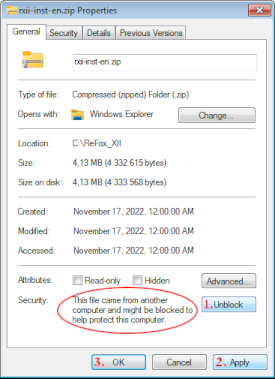
2. create new special folder for ReFox
(e.g. C:\ReFox_XII)
- do not install ReFox into common folder, on the desktop etc.
- in your AV define an exception for this folder to exclude it from scanning

and extract all files in the archive into this folder.
3. run setup program SET.ReFox.exe to install ReFox
- in case of any problems, see

FIX of some possible problems
- program does not start or fails
- virus warning
- program violation
- problem with help file
- Segoe Fluent Icons - font not found
4. read the EULA
 and confirm the agreement ...
5. fill out your details in the form
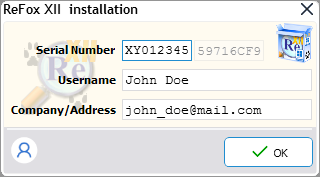
do not change the field 'Serial Number'
modify the fields 'User name' and 'Company' if necessary
and click [ ✓ OK ]
|
Copyright © 1992-2026 by Jan Brebera, ComPro (CZ)
ReFox is a property of its author - Jan Brebera Jan Brebera holds all rights relating to ReFox program |